快捷方法
语法
1
2
3
4
5
6
7
8
9
| <templateSet group="yifan">
<template name="psi" value="public static final int $name$ = $value$;" description="" toReformat="false" toShortenFQNames="true">
<variable name="name" expression="" defaultValue="" alwaysStopAt="true" />
<variable name="value" expression="" defaultValue="" alwaysStopAt="true" />
<context>
<option name="JAVA_CODE" value="true" />
</context>
</template>
</templateSet>
|
元素节点
- 模板集合
- 元素
templateSet:作为根元素节点,定义一个模板集合
- 属性
group:定义集合名称
- 模板内容
- 元素
template:定义一个模板
- 属性
name:定义模板名称
- 属性
value:定义模板内容,可以通过双$引用变量,例如:$name$
- 属性
description:模板描述
- 定义变量
- 元素
variable:定义一个自定义变量
- 属性
name:变量名,作为内容引用时的名称
- 属性
expression:表达式->具体参考连接
- 属性
defaultValue:默认值
- 属性
alwaysStopAt:光标停留?
- 常用表达式
- user():当前计算机的用户名
- date():当前时间
- methodName():当前方法名
- methodParameters():当前方法的输入参数
- methodReturnType():当前方法的返回值类型
- className():当前类的类名
- classNameComplete():当前类的完整类名
- 定义语言
- 语法:
<context><option name="【类型】" value="true"></context>
- Java类型:
JAVA_CODE
- Kotlin类型:
KOTLIN_STATEMENT
编辑
Android Studio
- 位置:设置->Editor->Live Templates
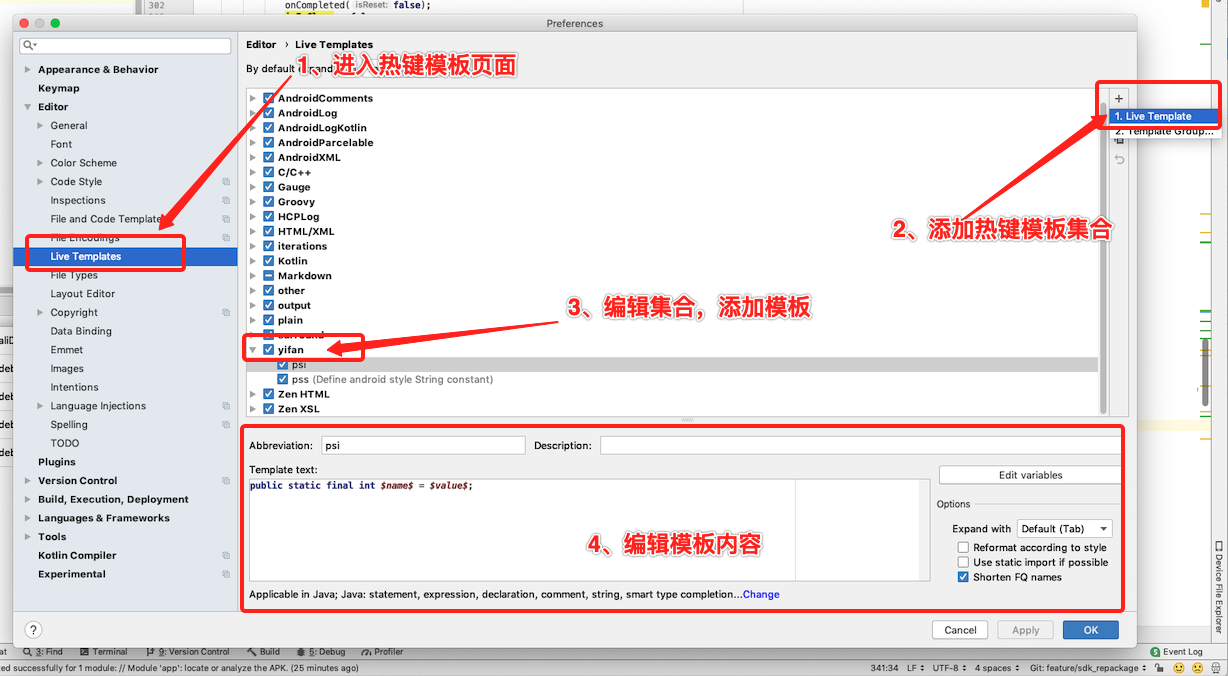
加入自定义模板
- 模板文件夹位置
- Windows: .IntelliJ
- IDEA\config\templates
- Linux: ~IntelliJ IDEA/config/templates
- macOS(IDEA): ~/Library/Preferences/IntelliJ IDEA/templates
- macOS(Android Studio):~/Library/Preferences/AndroidStudio【版本号】/templates
Kotlin
为kotlin添加log快捷方法
如果创建普通的java语言Android项目,输入logt、logi、loge等会自动提示补全,但创建kotlin项目之后,快捷方法输入就不起作用了,如果使用println()又没有默认的tag标记,可以通过以下方法进行手动添加log快捷方法输入
- 在创建的文件中添加配置文件(androidLogKotlin.xml)
1
2
3
4
5
6
7
8
9
10
11
12
13
14
15
16
17
18
19
20
21
22
23
24
25
26
27
28
29
30
31
32
33
34
35
36
37
38
39
40
41
42
43
44
45
46
47
48
49
50
| <templateSet group="AndroidLogKotlin">
<template name="logm" value="android.util.Log.d(TAG, $FORMAT$)" description="Log method name and its arguments" toReformat="true" toShortenFQNames="true">
<variable name="FORMAT" expression="groovyScript("def params = _2.collect {it + ' = [$' + it + ']'}.join(', '); return '\"' + _1 + '() called' + (params.empty ? '' : ' with: ' + params) + '\"'", kotlinFunctionName(), functionParameters())" defaultValue="" alwaysStopAt="false" />
<context>
<option name="KOTLIN_STATEMENT" value="true" />
</context>
</template>
<template name="logd" value="android.util.Log.d(TAG, "$METHOD_NAME$: $content$")" description="Log.d(String)" toReformat="true" toShortenFQNames="true">
<variable name="METHOD_NAME" expression="kotlinFunctionName()" defaultValue="" alwaysStopAt="false" />
<variable name="content" expression="" defaultValue="" alwaysStopAt="true" />
<context>
<option name="KOTLIN_STATEMENT" value="true" />
</context>
</template>
<template name="loge" value="android.util.Log.e(TAG, "$METHOD_NAME$: $content$", $exception$)" description="Log.e(Exception, String)" toReformat="true" toShortenFQNames="true">
<variable name="METHOD_NAME" expression="kotlinFunctionName()" defaultValue="" alwaysStopAt="false" />
<variable name="content" expression="" defaultValue="" alwaysStopAt="true" />
<variable name="exception" expression="" defaultValue="e" alwaysStopAt="true" />
<context>
<option name="KOTLIN_STATEMENT" value="true" />
</context>
</template>
<template name="logi" value="android.util.Log.i(TAG, "$METHOD_NAME$: $content$")" description="Log.i(String)" toReformat="true" toShortenFQNames="true">
<variable name="METHOD_NAME" expression="kotlinFunctionName()" defaultValue="" alwaysStopAt="false" />
<variable name="content" expression="" defaultValue="" alwaysStopAt="true" />
<context>
<option name="KOTLIN_STATEMENT" value="true" />
</context>
</template>
<template name="logw" value="android.util.Log.w(TAG, "$METHOD_NAME$: $content$")" description="Log.w(Exception, String)" toReformat="true" toShortenFQNames="true">
<variable name="METHOD_NAME" expression="kotlinFunctionName()" defaultValue="" alwaysStopAt="false" />
<variable name="content" expression="" defaultValue="" alwaysStopAt="true" />
<context>
<option name="KOTLIN_STATEMENT" value="true" />
</context>
</template>
<template name="logwtf" value="android.util.Log.wtf(TAG, "$METHOD_NAME$: $content$")" description="Log.wtf(Exception, String)" toReformat="true" toShortenFQNames="true">
<variable name="METHOD_NAME" expression="kotlinFunctionName()" defaultValue="" alwaysStopAt="false" />
<variable name="content" expression="" defaultValue="" alwaysStopAt="true" />
<context>
<option name="KOTLIN_STATEMENT" value="true" />
</context>
</template>
<template name="logt" value="private const val TAG = "$NAME$";" description="A static logtag with your current classname" toReformat="true" toShortenFQNames="true">
<variable name="NAME" expression="fileNameWithoutExtension()" defaultValue="" alwaysStopAt="false" />
<context>
<option name="KOTLIN" value="true" />
</context>
</template>
</templateSet>
|
- 重启Android Studio
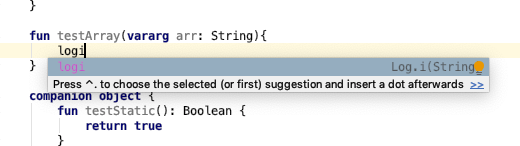
- 输入
logt、logi、loge等会自动提示补全
参考链接